Video Editors' SSD Guide

Video Editors' SSD Guide

Everything You Need to Know

1. External HDD vs SSD: What's the Difference?

HDD (Hard Disk Drive)

  • Pros: Cheap storage per GB, good for backups

  • Cons: Slow, (moving parts can fail), noisy, heavy

  • Speed: 80-160 MB/s read/write

SSD (Solid State Drive)

  • Pros: Fast, durable, silent, lightweight, energy-efficient

  • Cons: More expensive per GB

  • Speed: 500-2,000+ MB/s depending on type

Why This Matters for Video Editing

When you scrub footage, color grade, or render, your drive needs to send data instantly.
If the drive is slow → your timeline lags. No CPU, no RAM can save you if storage is slow.

Note: This guide focuses on external SSDs, but the same principles apply when choosing internal SSDs.

2. SSD Speeds Explained

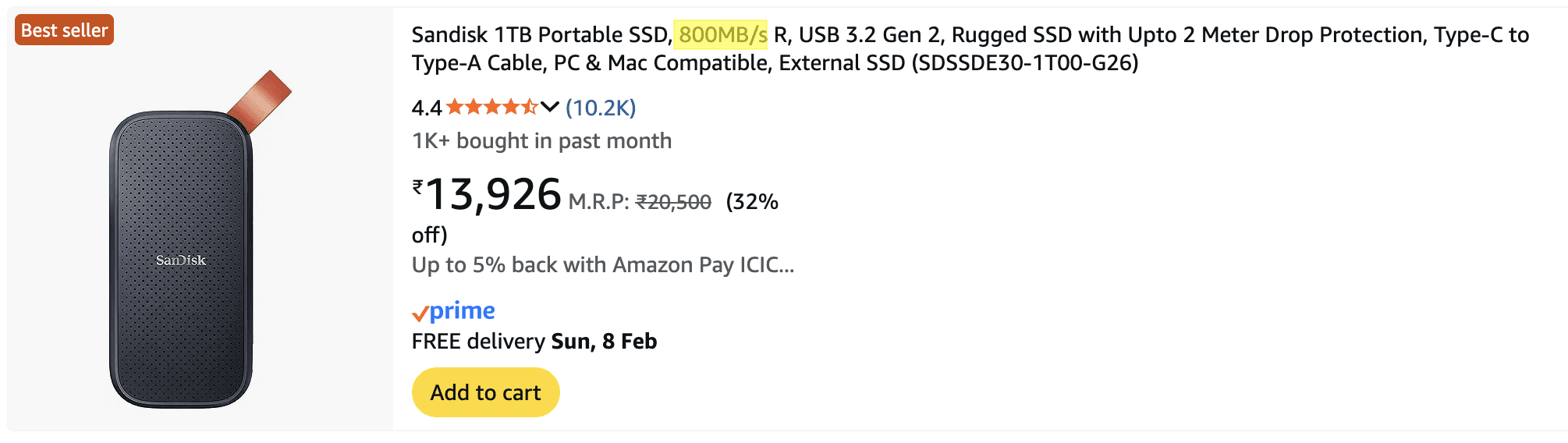
Speed: 800MB/s

  • Speed: 800MB/s

  • Best for: FHD,2K editing, backups

  • Video editing: Works for 1080p

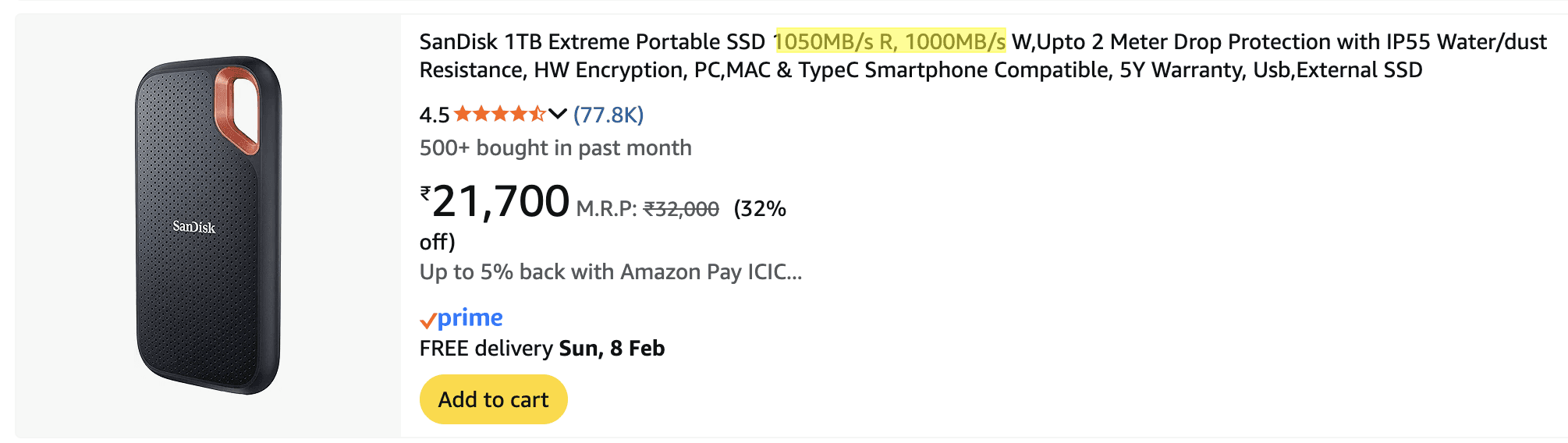
Speed: 1,000 MB/s +

  • Speed: 1,000 MB/s+

  • Best for: Most video editors (sweet spot)

  • Video editing: Handles 4K smoothly, good for most workflows

With this speed you can directly edit straight from the SSD.
What Speed Do YOU Need?

  • FHD/2k editing: USB 3.2 Gen 2 minimum (800-1,000 MB/s)

  • 4K multi-cam/6K: Thunderbolt/USB 4 (1000+ MB/s)

Pro Tip: Check your computer's ports. Having a fast SSD means nothing if your port is USB 3.0 and can't deliver the speed.

3. When to Buy an SSD

Current Situation

SSD prices are rising due to manufacturing constraints and increased demand.

BUY NOW if:

  • ✅ You're currently using an HDD for editing

  • ✅ Your current SSD is over 80% full

  • ✅ You find a good deal (major sales events)

  • ✅ You're actively losing time due to slow transfers/playback

WAIT if:

  • ⏸️ Your current SSD works fine with plenty of space

  • ⏸️ You're 1-2 months from Black Friday/major sales

NEVER wait if:

  • 🚨 You're missing deadlines because of storage speed

  • 🚨 Your drive is failing (clicking sounds, errors)

BUYING STRATEGY

Recommended Setup:

  • Active Projects: 1-2TB external SSD (USB 3.2 Gen 2 or better)

  • Archives: External HDD (4TB+) for completed projects only

Price Guidance:

  • Quality brands: Samsung T7/T9, SanDisk Extreme, Crucial X8/X10

  • Track prices before buying—sales can save 30-40%

  • Avoid unknown brands with suspiciously low prices

FINAL RECOMMENDATION

Stop editing from HDD.You’re losing time, energy, and creative flow.

If budget is tight →Buy 500GB or 1TB SSD now instead of waiting forever.

Speed = Productivity.

Everything You Need to Know

1. External HDD vs SSD: What's the Difference?

HDD (Hard Disk Drive)

  • Pros: Cheap storage per GB, good for backups

  • Cons: Slow, (moving parts can fail), noisy, heavy

  • Speed: 80-160 MB/s read/write

SSD (Solid State Drive)

  • Pros: Fast, durable, silent, lightweight, energy-efficient

  • Cons: More expensive per GB

  • Speed: 500-2,000+ MB/s depending on type

Why This Matters for Video Editing

When you scrub footage, color grade, or render, your drive needs to send data instantly.
If the drive is slow → your timeline lags. No CPU, no RAM can save you if storage is slow.

Note: This guide focuses on external SSDs, but the same principles apply when choosing internal SSDs.

2. SSD Speeds Explained

Speed: 800MB/s

  • Speed: 800MB/s

  • Best for: FHD,2K editing, backups

  • Video editing: Works for 1080p

Speed: 1,000 MB/s +

  • Speed: 1,000 MB/s+

  • Best for: Most video editors (sweet spot)

  • Video editing: Handles 4K smoothly, good for most workflows

With this speed you can directly edit straight from the SSD.

What Speed Do YOU Need?

  • FHD/2k editing: USB 3.2 Gen 2 minimum (800-1,000 MB/s)

  • 4K multi-cam/6K: Thunderbolt/USB 4 (1000+ MB/s)

Pro Tip: Check your computer's ports. Having a fast SSD means nothing if your port is USB 3.0 and can't deliver the speed.

3. When to Buy an SSD

Current Situation

SSD prices are rising due to manufacturing constraints and increased demand.

BUY NOW if:

  • ✅ You're currently using an HDD for editing

  • ✅ Your current SSD is over 80% full

  • ✅ You find a good deal (major sales events)

  • ✅ You're actively losing time due to slow transfers/playback

WAIT if:

  • ⏸️ Your current SSD works fine with plenty of space

  • ⏸️ You're 1-2 months from Black Friday/major sales

NEVER wait if:

  • 🚨 You're missing deadlines because of storage speed

  • 🚨 Your drive is failing (clicking sounds, errors)

BUYING STRATEGY

Recommended Setup:

  • Active Projects: 1-2TB external SSD (USB 3.2 Gen 2 or better)

  • Archives: External HDD (4TB+) for completed projects only

Price Guidance:

  • Quality brands: Samsung T7/T9, SanDisk Extreme, Crucial X8/X10

  • Track prices before buying—sales can save 30-40%

  • Avoid unknown brands with suspiciously low prices

FINAL RECOMMENDATION

Stop editing from HDD.You’re losing time, energy, and creative flow.

If budget is tight →Buy 500GB or 1TB SSD now instead of waiting forever.

Speed = Productivity.

Video Editors' SSD Guide

Video Editors' SSD Guide

Pro Editors Club

You’ve Scrolled Enough.
Now It’s Time to Create.

15 weeks from now, you could still be scrolling…

 or editing videos that make people stop scrolling.