Why Storyboard Before You Edit?
Most editors open the timeline and start figuring things out while editing. That is the slowest way to work. Planning and executing are two completely different mindsets, and mixing them is what kills your speed.
A storyboard is the complete creative plan. Every idea, every visual, every transition is decided here. That is where all the heavy creative thinking happens.
Editing is pure execution. When the plan is locked, 80% of the edit is already decided. You just build what is on the board. No second-guessing, no cognitive load, one task at a time.
Separate the two and your editing speed goes up drastically.
The Structure We Follow
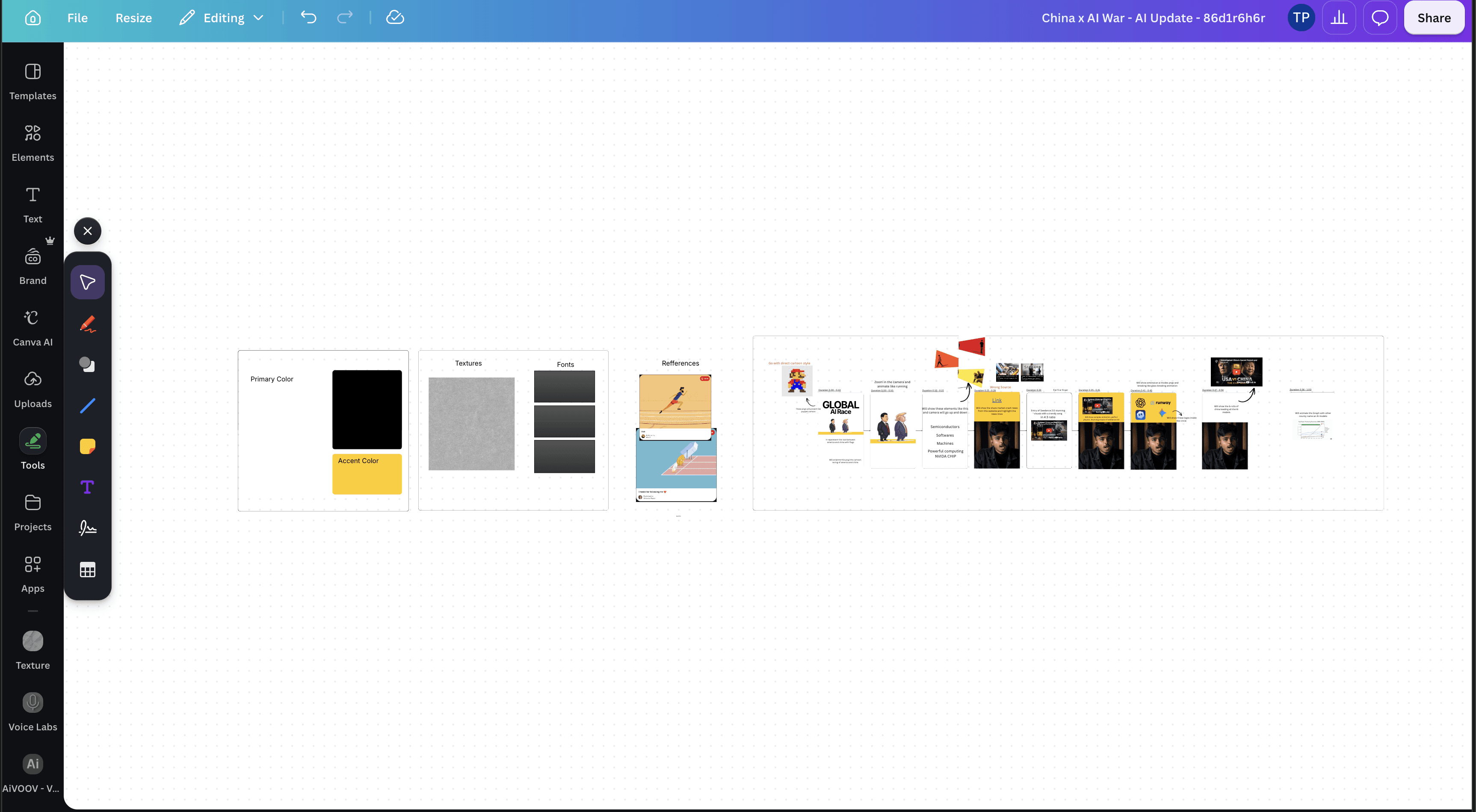
We use a simple Canva Whiteboard. It is free with any Canva account. Open Canva, create a new Whiteboard, and divide it into 4 boxes.
Box 1: Colours
Lock your Primary Colour and your Accent Colour. The primary sets the overall mood of the video. The accent is what you use to highlight and draw attention. Decide this once so every frame stays consistent.
Box 2: Textures and Fonts
Pick the textures you want to use for backgrounds and overlays, and the fonts you will use for titles and captions. Fixing these upfront means you never stop mid-edit to search for a font.
Box 3: References
Collect visual references for the style you are going for. Pinterest is the easiest place to grab them. Drop them into this box so the look is clear before you touch the timeline.
Box 4: Segments (The Main Part)
Once the first three boxes are done, break your content into segments, duration by duration. For each segment, note exactly what comes on screen. Use Canva elements to place the visuals so you get a pre-visualisation of how the final video will look.
Lock It, Then Execute
Once the board is done, get it approved before you touch the timeline. In a team, show it to your senior or the founder. As a freelancer, send it to your client. The moment it is approved, you go straight into execution with zero back-and-forth.
That is the whole system. Plan once with full creative focus, then execute in a pure output mode. Your speed goes up, your revisions go down, and you stop burning energy on decisions inside the timeline.

You’ve Scrolled Enough.
Now It’s Time to Create.
15 weeks from now, you could still be scrolling… or editing videos that make people stop scrolling.